
 I was always interested in accessibility, but I never had to comply with any guidelines before. At W3C, accessibility is considered very important, so everything we make needs to pass WCAG 2.0 AA level. Therefore, I found myself calculating color contrast ratios very frequently. It was a very enlightening experience. I used to think that WCAG-mandated contrast ratios were too restrictive and basically tried to force you to use black and white, a sentiment shared by many designers I’ve spoken to. Surprisingly, in practice, I found that in most cases they are very reasonable: When a color combination doesn’t pass WCAG, it usually *is* hard to read. After all, the possible range for a contrast ratio is 1-21 but only ratios lower than 3 don’t pass WCAG AA (4.5 if you have smaller, non-bold text). So, effectively 90% of combinations will pass (82.5% for smaller, non-bold text).
There are plenty of tools out there for this. However, I found that my workflow for checking a contrast ratio with them was far from ideal. I had to convert my CSS colors to hex notation (which I don’t often use myself anymore), check the contrast ratio, then adjust the colors as necessary, covert again etc. In addition, I had to adjust the lightness of the colors with a blindfold, without being able to see the difference my adjustments would make to the contrast ratio. When using semi-transparent colors, it was even worse: Since WCAG only describes an algorithm for opaque colors, all contrast tools only expect that. So, I had to calculate the resulting opaque colors after alpha blending had taken place. After doing that for a few days, I got so fed up that I decided to make my own tool.
In addition, I discovered that there was no documented way of calculating the contrast ratio range that can be produced with a semi-transparent background, so I came up with an algorithm (after many successive failures to find the range intuitively), published it in the w3c-wai-ig mailing list and used the algorithm in my app, effectively making it the first one that can accept semi-transparent colors. If your math is less rusty than mine, I’d appreciate any feedback on my reasoning there.
Below is a list of features that make this tool unique for calculating color contrast ratios:
- Accepts any CSS color the browser does, not just hex colors. To do this, it defers parsing of the color to the browser, and queries the computed style, which is always rgb() or rgba() with 0-255 ranges which be parsed much more easily than the multitude of different formats than modern browsers accept (and the even more that are coming in the future).
- Updates as you type, when what you’ve typed can be parsed as a valid CSS color.
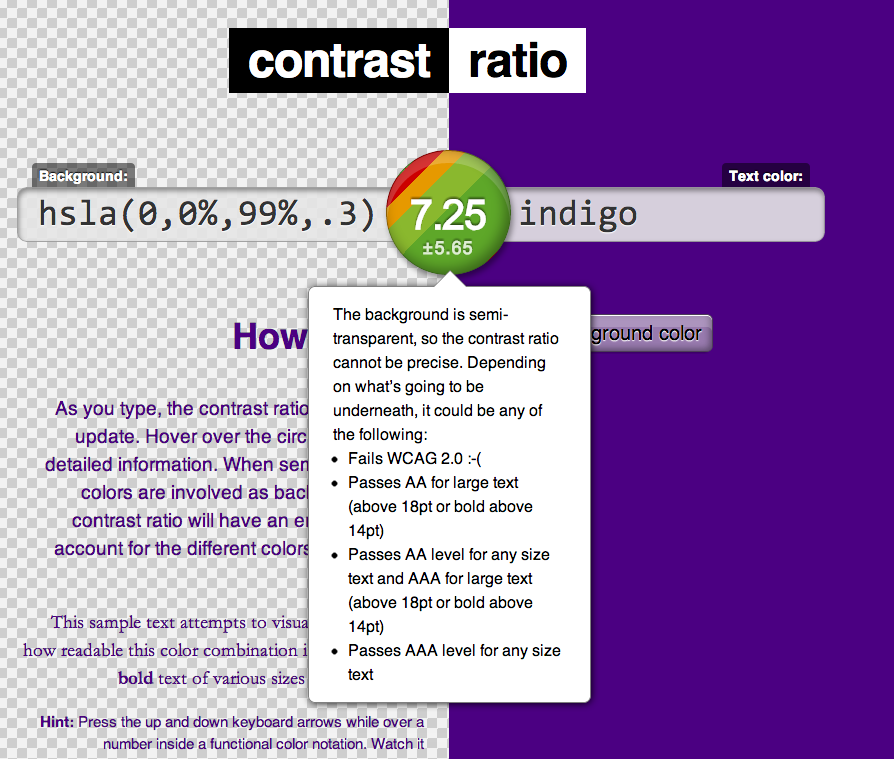
- Accepts semi transparent colors. For semi-transparent backgrounds, the contrast ratio is presented with an error margin, since it can vary depending on the backdrop. In that case, the result circle will not have a solid background, but a visualization of the different possible results and their likelihood (see screenshot).
- You can share your results by sharing the URL. The URL hashes have a reasonable structure of the form #foreground-on-background, e.g. #black-on-yellow so you can even adjust the URL as a form of input.
- You can adjust the color by incrementing or decrementing its components with the keyboard arrow keys until you get the contrast right. This is achieved by including my Incrementable library.
Browser support is IE10 and modern versions of Firefox, Safari, Chrome, Opera. Basic support for IE9. No responsive version yet, sorry (but you can always send pull requests!)
Save the link: contrast-ratio.com
Edit 2022: Link updated to reflect current one. Original link was leaverou.github.com/contrast-ratio