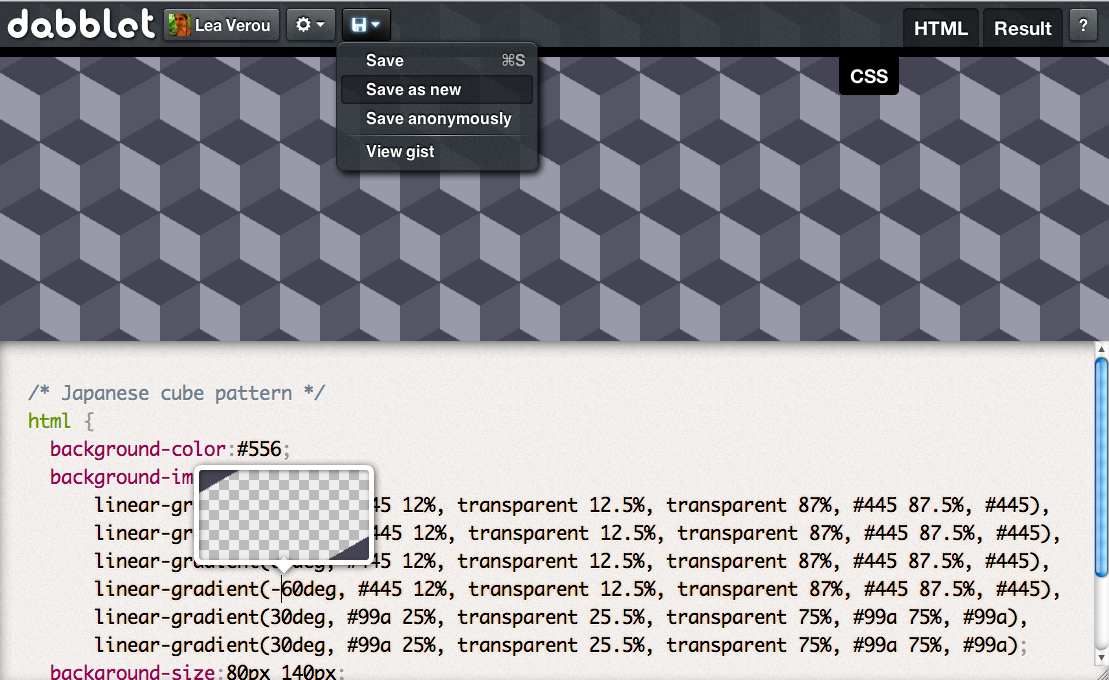
Introducing dabblet: An interactive CSS playground

I loved JSFiddle ever since I first used it. Being able to test something almost instantly and without littering my hard drive opened new possibilities for me. I use it daily for experiments, browser bug testcases, code snippet storage, code sharing and many other things. However, there were always a few things that bugged me:

  • JSFiddle is very JS oriented, as you can tell even from the name itself
  • JSFiddle is heavily server-side so there’s always at least the lag of an HTTP request every time you make an action. It makes sense not to run JS on every keystroke (JSBin does it and it’s super annoying, even caused me to fall in an infinite loop once) but CSS and HTML could be updated without any such problems.
  • I’m a huge tabs fan, I hate spaces for indenting with a passion.
  • Every time I want to test a considerable amount of CSS3, I need to include -prefix-free as a resource and I can’t save that preference or any other (like “No library”).
Don’t get me wrong, I LOVE JSFiddle. It was a pioneer and it paved the way for all similar apps. It’s great for JavaScript experiments. But for pure CSS/HTML experiments, we can do better.
The thought of making some interactive playground for CSS experiments was lingering in my mind for quite a while, but never attempted to start it as I knew it would be a lot of fascinating work and I wouldn’t be able to focus on anything else throughout. While I was writing my 24ways article, I wanted to include lots of CSS demos and I wanted the code to be editable and in some cases on top of the result to save space. JSFiddle’s embedding didn’t do that, so I decided to make something simple, just for that article. It quickly evolved to something much bigger, and yes I was right, it was lots of fascinating work and I wasn’t able to focus on anything else throughout. I even delayed my 24ways article for the whole time I was developing it, and I’m grateful that Drew was so patient. After 3 weeks of working on it, I present dabblet.

Features

So what does dabblet have that similar apps don’t? Here’s a list:

  • Realtime updates, no need to press a button or anything
  • Saves everything to Github gists, so even if dabblet goes away (not that I plan to!) you won’t lose your data
  • No page reloads even on saving, everything is XHR-ed
  • Many familiar keyboard shortcuts
  • Small inline previewers for many kinds of CSS values, in particular for: colors, absolute lengths, durations, angles, easing functions and gradients. Check them all in this dabblet.
  • Automatically adds prefixes with -prefix-free, to speed up testing
  • Use the Alt key and the up/down arrows to increment/decrement <length>, <time> and <angle> values.
  • Dabblet is open source under a NPOSL 3.0 license
  • You can save anonymously even when you are logged in
  • Multiple view modes: Result behind code, Split views (horizontal or vertical), separate tabs. View modes can be saved as a personal preference or in the gists (as different demos may look better with different view modes)
  • Editable even from an embedded iframe (to embed just use the same dabblet URL, it will be automatically adjusted through media queries)
Here’s a rough screencast that I made in 10 minutes to showcase some of dabblet’s features. There’s no sound and is super sloppy but I figured even this lame excuse of a screencast is better than none.

I’m hoping to make a proper screencast in the next few days.
However, dabblet is still very new. I wouldn’t even call it a beta yet, more like an Alpha. I’ve tried to iron out every bug I could find, but I’m sure there are many more lingering around. Also, it has some limitations, but it’s my top priority to fix them:
  • It’s currently not possible to see or link to older versions of a dabblet. You can of course use Github to view them.
  • It currently only works in modern, CORS-enabled browsers. Essentially Chrome, Safari and Firefox. I intend to support Opera too, once Opera 12 comes out. As for IE, I’ll bother with it when a significant percentage of web developers start using it as their main browser. Currently, I don’t know anyone that does.
  • It doesn’t yet work very well on mobile but I’m working on it and it’s a top priority
  • You can’t yet add other scripts like LESS or remove -prefix-free.
  • Hasn’t been tested in Windows very much, so not sure what issues it might have there.
I hope you enjoy using it as much as I enjoyed making it. Please report any bugs and suggest new features in its bug tracker.

Examples

Here are some dabblets that should get you started:

Credits

Roman Komarov helped tremendously by doing QA work on dabblet. Without his efforts, it would have been super buggy and much less polished.

I’d also like to thank David Storey for coming up with the name “dabblet” and for his support throughout these 3 weeks.

Last but not least, I’d also like to thank Oli Studholme and Rich Clark for promoting dabblet in their .net magazine articles even before its release.

Update: Dabblet has its own twitter account now: Follow @dabblet

  • http://twitter.com/tjbarber09 T.J. Barber

    It’s beautiful, Lea!! I’m going to be using this alot. And also, I’m using Chrome on Windows and it seems to be working fine. =)

  • http://abarcarodriguez.com Alejandro Abarca R

    Amazing! I’ll help you out searching for bugs and send you some ideas. Congratulations, amazing work!

  • Anonymous

    That is completely awesome. Looking forward to seeing it develop!

  • http://abarcarodriguez.com Alejandro Abarca R

    Works: Chrome/Firefox/Opera under Linux
    Don’t work: Midori under Linux

  • http://twitter.com/jonshariat Jonathan Shariat

    Lea this looks awesome, I can’t wait to use it!

  • http://leaverou.me Lea Verou

    Thank you!

  • http://www.erikphipps.com Erik Phipps

    Lea, I love how you don’t post for three weeks then drop some awesome tool on us! 

  • http://twitter.com/thebabydino Ana

    There are a couple of small problems with the inline previewers for angles and durations (Chrome on Windows)

  • http://twitter.com/jiserra Juan Ignacio

    Wow, this has some amazing features that no desktop app owns, amazing work Lea!

  • http://leaverou.me Lea Verou

    Ouchie. Can you please file a bug? https://github.com/LeaVerou/dabblet/issues

  • http://twitter.com/thebabydino Ana

    There are a couple of small problems with the inline previewers for angles and durations (Chrome on Windows) – 1st image.

    Totally unrelated, the YouTube embed in the post comes over the notice bar -2nd image.

  • Jeroen Franse

    Saving was easy, but opening a gist made me think. I read your blog post, even watched the whole screencast. After looking at the url I realised: ‘off course, the gist number!’
    Apart from that, WOW!

  • http://twitter.com/PowerMugen Mugen Sama

    seems nice and easy, but I’ve got one big problem to test it more… I can’t type the ‘ # ‘ character, because when I type “alt gr ” I’m redirected to the result tab … 
     

  • Jeroen Franse

    When I copy text  from the dabblet editor and paste there, line breaks are added before and after the pasted text. It doesn’t happen when I copy from somewhere else (the adress bar)
    Windows, Chrome.

  • http://leaverou.me Lea Verou

    Where are you trying to paste? I just tried to paste in TextEdit and it worked fine.

  • http://twitter.com/glsee See Guo Lin

    Brilliant!

  • Gabriel Petrioli

    Confirming this bug. Copying anything from inside your editor to another place inside your editor, introduces line-breaks before and after the pasted text.
    To reproduce just select a word and copy/paste it on itself..
    Windows/Chrome

  • Jeroen Franse

    Copy from and paste inside the dabblet editor itself. Created an issue.

  • http://www.xhtml-css.net/css/xhtml-css-templates-introducing-dabblet-an-interactive-css-playground-lea-verou xhtml css templates – Introducing dabblet: An interactive CSS playground | Lea Verou | XHTML CSS – Style sheet and html programming tutorial and guides

    [...] more from the original source: Introducing dabblet: An interactive CSS playground | Lea Verou Share and [...]

  • http://twitter.com/dumaurier Josh Vogt

    This is a a great tool and there’s a hell of a lot of polish for what you’re calling an alpha release. 

    One small thing, the keyboard shortcuts collide with Safari’s for navigating to sites in the bookmark bar (if your site was the first in my bar Command-1 would take my there not to the CSS screen).

  • http://leaverou.me Lea Verou

    Yes, I noticed that. However, both Ctrl and Cmd works, so you could use Ctrl instead in Safari. :)

  • http://twitter.com/jameswillweb james williamson

    Thank you for everything you do and how much you give back to the community. It’s humbling…

  • http://twitter.com/dumaurier Josh Vogt

    Awesome! Problem solved. 

  • http://twitter.com/adantj Adan Alvarado

    I follow you on github and I started seeing that you were constantly uploading gists and updating them, I was almost sure they had a reason :D .

    I really like what I saw so far, nice work!

  • http://internuts.se/ internuts

    I just tested on Chrome under Windows 7 and I do not see that problem.

  • http://twitter.com/DavideFantu Davide Fantuzzi

    Thank you Lea, nice tool ;) I like your works very much

  • http://graphiceyedea.com/bookmarks/?p=2591 Introducing dabblet: An interactive CSS playground | Lea Verou – bookmarks
  • Piecu

    What I miss is to edit HTML and CSS on the same screen along with previewing the result (merge these three tabs into one).

  • http://leaverou.me Lea Verou

    Yup, many people have requested that and it’s really trivial to add. What I’m not sure is how they should be laid, e.g. three rows? three columns? a column with CSS+HTML and another with the result? etc. 
    Ideally, the developer should be able to specify a custom layout for each tab (css, html, result), so I’m wondering what would be a UI for that that’s both easy to use and understand, and reasonably easy to code.

  • http://web-design-weekly.com/2011/12/16/web-design-weekly-25/ Web Design Weekly #25 | Web Design Weekly

    [...] Dabblet [...]

  • http://twitter.com/operatino Харитонов Роберт

    Would be great to have zen coding inside dabblet

  • http://twitter.com/lucienimmink lucien immink

    Wow, awesome tool!

  • Coffee? Yes, please.

    Okay, you have some serious ninja skills.
    Is dabblet open source?

  • http://leaverou.me Lea Verou

    Thanks!

    Yes it is, but with a non-profit restriction (NPOSL license). Fork it on github: https://github.com/LeaVerou/dabblet/

  • Marco

    Similar problem with Chrome on XP, anyway great job Lea!

  • http://rathersplendid.net Zander Martineau

    Really incredible work Lea, thank you for this.

  • http://www.cdettmar.com C. Dettmar

    I already love it, and I’m already using it haha
    I tried to use some js on it but didnt worked, but I’m not sure if it is an issue or if dabblet doesn’t support it, it has support at all?

  • http://twitter.com/tsironakos Dimitris Tsironis

    Ok, this is seriously mind-blowing and cool. I had several nerdgasms the first minutes with it. I would dare to say, it’s life-changing.

    Also, I want to marry the color palette of the text highlight and the popups for the color and gradients. I want these features in my editor NOW!

    Damn you, Lea. You ‘ve done it again!

  • http://twitter.com/tsironakos Dimitris Tsironis

    Ok this is seriously cool and mind-blowing! I think it’s life-changing in terms of sharing CSS & HTML snippets.

    Also, I love the color palette of the syntax highlighting and the popup boxes for the color and gradients etc. I want these features in my editor NOW.

    Damn you, Lea! You ‘ve done it again.
     
    I’ll contribute with bugs report or any idea I think it’s cool.

  • http://twitter.com/PauldeWouters PauldeWouters

    CSSDesk does this: 
    http://cssdesk.com/

  • http://pulse.yahoo.com/_YDJRPMWHRS52RBOPJURVS4LKEE Bridget Stewart

    Wow! Nice job!

  • http://twitter.com/Luc_Bietry Luc Biétry

    Une traduction en français ? Bravo et merci.

  • http://twitter.com/andyhume Andy Hume

    Really nice, Lea. Great work.

  • http://irvbriscoe.com Irving Briscoe

    sooo cool. thanks

  • http://pancaketheorem.com/dabblet-wordpress-hell-week/ Dabblet, WordPress, Hell Week – pancake theorem

    [...] is like JSFiddle with a CSS flavor, built by one of my favorites on the Web, Lea Verou. The connection to Github is seamless, and it’s definitely one of my favorite new web coding [...]

  • http://pioul.fr Pioul

    Looks really promising! Still a few things to work out, such as editing HTML, CSS, and previewing on the same page (like JSfiddle, minus the JavaScript), but i really like it.
    Especially contextual tooltips, when usefulness meets fanciness!

  • http://leaverou.me Lea Verou

    I haven’t really tested it with JS. It should work, if properly placed inside <script> tags.

  • http://leaverou.me Lea Verou

    Thank you!

  • http://www.stookstudio.com/ Erwin Heiser

    Dude, seriously? Le monolinguisme est une maladie curable :)

  • http://lea.verou.me/2011/12/on-web-apps-and-their-keyboard-shortcuts/ On web apps and their keyboard shortcuts | Lea Verou

    [...] I released dabblet. One of its aspects that I took extra care of, is it’s keyboard navigation. I used many of the [...]

  • http://www.google.com/profiles/taecilla Tae

    Amazing! Now you are my hero!

  • http://twitter.com/andrewsfg Andrews F.G

    Lea Verou. Thank you so much. This tool help me so much in the tests of CSS3, animations etc. I  ’m a fan of your work. Greetings from Brazil.

  • Anonymous

    This is a great catalyst, thank you! One thing you could do that would probably be easy, and would make good use of dabblet would be to offer some koans.

    Some html, and an image of a design that we need give the HTML (and a reference to a good learning source, for those of us without the experience to work on them).

    As a developer, I’ve found this approach incredibly effective. Lots of small focused challenges can teach me more in a few hours than working without specific direction for a few weeks.

  • Kai Mallea

    Thanks for this, it’s a great utility.

  • CodePsd

    I would love to use in-browser editor on my desktop instead of my regular code editor. I just wish you will add some features like I am trying to on my super alpha test stage editor so that I can stop developing mine and use yours. See here -> http://codepsd.com/editor .

    Great job Lea!  

  • http://leaverou.me Lea Verou

    Dabblet isn’t really meant to be a full in-browser editor, it’s meant for quick tests. If you want an in-browser editor, take a look at Cloud9 IDE (http://c9.io/), I think you’ll love it :)

  • http://slicescript.com/weekly-web-roundup-for-december-18th-2011/ Weekly Web Roundup for December 18th 2011

    [...] Lea Verou – Introducing dabblet: An interactive CSS playground [...]

  • http://twitter.com/greenido Ido Green

    This is so powerful… thank you for the idea and execution! great stuff!

  • Eruptia

    What a wonterful job you’ve done right here, as always ! Thank you so much Lea, this is an amazing app’, very useful.

    Kep going ! :)

  • http://blog.aperto.de/webdesign-adventslink-20-live-coding-mit-dabblet/ Webdesign-Adventslink #20: Live coding mit Dabblet « Aperto-Blog
  • CodePsd.com

    Dabblet will be just what I want for in-browser editor. I am only waiting to see if you will add code completition to it. I don’t need anything else. The only thing is I am want to use it offline so I will need to somehow disable the result.html and make it insert code directly into iframe.  

    You could make an offline editor from it too. Get some people to help you. Then charge for it or accept donations. I would definety donate for dabblet cause it’s just freakin awsome!

  • http://functionscopedev.wordpress.com/2011/12/16/dabblet-in-fun-on-friday/ Dabblet in fun on Friday | FunctionSource Development

    [...] Verou has created Dabblet, an “interactive CSS playground”. Think, JS Fiddle optimized for CSS goodness. It has a [...]

  • Anonymous

    Wow, brilliant!  Adding to my go-to tool list

  • http://fatal.myopenid.com/ Andrey

    Unfortunately CSSDesk and Dabblet don’t support IE 8 — must have for another couple years at least.

  • http://leaverou.me Lea Verou

    That’s what the full page result is for :)

  • http://davidefantuzzi.it/2011/dabblet/ dabblet: un nuovo CSS playground – Davide FantuzziDavide Fantuzzi

    [...] corto, questo tool si chiama Dabblet ed è stato sviluppato da Lea Verou (qui potete trovare la sua [...]

  • http://thinsoldier.com/ thinsoldier

    Pleasantly surprised by how many keyboard shortcuts I was able to find/guess correctly. Great tool.

  • Mot Tie

    I would love to see some way to add a url pointing to the dabblet within the gist… maybe as inside of the css comment. I’m asking because when I follow someone on Github, I can see they made a dabblet, but then I need to figure out the url to go see it… 
    http://dabblet.com/gist/ then the gist they made. Thanks! Rob

  • http://leaverou.me Lea Verou

    I’d love to do this (I’ve thought about it too), but I don’t like the idea of modifying people’s code, and github doesn’t offer any other way :(

  • Mot Tie

    What about adding the url inside of the “settings.json”?

  • http://leaverou.me Lea Verou

    What’s the point? It still won’t be clickable.

  • http://beben-koben.myopenid.com/ Beben Koben

    Truly the master Lea Verou of a kind woman ♥
    I have this
    http://prodigy-of-head.googlecode.com/svn/trunk/HTML%20EDITOR.html
    May be useful. It supports for all. Just stay put the tag.
    If CSS coded
    CODED HERE
    If Script
    SCRIPT CODED HERE

    But can not save :D
    ty

  • http://usb3gvn.com USB 3G

    Well, interesting post,
    thanks!

  • Sushil bharwani

    I see this as a very nice attempt. But have few issues like on chrome i am not able to login with my github account, one ie 7 it gives number of javascript errors.

  • http://leaverou.me Lea Verou

    IE7?? Which developer uses IE7 for crying out loud? I hardly care about that dinosaur on regular websites any more, let alone ones targeted to developers.

    What issue are you having with Chrome?

  • Sushil bharwani

    Well IE 7 is regular supported browser on our applications but lets forget it for a while. With chrome when i click on login and do a login with github it gives a white screen and the process halts. But yes like jsfiddle your app is already in my tool box. Also i added prefixfree to my set of tools

  • http://leaverou.me Lea Verou

    Browser support should be dictated by target audience. A website for a general audience might want to support IE7, but for a website targeted to developers (like dabblet) it’s pointless effort, since no developer uses IE7 as their main browser. Even IE9 isn’t supported, as the percentage of IE users in developer websites is tiny, even though it should be supported when a website is targeted to the general public.

    That said, if you make something you wish to test in IE7, you can use the “full page result” which is generated server-side, but use it with restraint as it consumes server resources.

    The Chrome issue you are describing however is indeed serious (although I’ve never heard anyone else have it). Could you please file a bug report here: https://github.com/LeaVerou/dabblet/issues and describe it in more detail? (i.e. Chrome version, operating system, are you logged in to github and any other detail that might be significant). Thanks!

  • Sushil bharwani

    While writing js in jsfiddle i see how it behaves in ie7 whether i need to add something specific for it or not. The site though developer centric should help developer to let him test his code in not so friendly browser also. Yes i understand that i could always do that by copying the code and then writing it back somewhere in local. 

  • http://leaverou.me Lea Verou

    Like I said, for this very purpose of testing in older browsers there is the “View full page result” feature. That will work anywhere, since it has none of the dabblet UI around it (provided your code itself works there of course).

  • http://twitter.com/JSushil sushil bharwani

    Thanks, I have never seen somebody replying so promptly. Way to go…

  • http://leaverou.me Lea Verou

    Hehe, thanks. I don’t always reply that quickly. I just haven’t started working yet for today. Sometimes I don’t have time to reply instantly and then I forget and end up never replying.

  • http://twitter.com/JSushil sushil bharwani

    I just read your css3 post on 24 ways and found it very well written and landed on your blogpost now reading your posts one by one. Really impressed with your writing and technical skills following you on twitter.

  • http://derekscrib.wordpress.com/2012/01/27/dereks-dope-list-archive-2/ Derek’s Dope List Archive | Derek's Crib

    [...] Introducing dabblet: An interactive CSS playground [...]

  • http://csschops.com/introducing-dabblet-an-interactive-css-playground-lea-verou/ Introducing dabblet: An interactive CSS playground | Lea Verou | CSS Chops

    [...] Introducing dabblet: An interactive CSS playground | Lea Verou: “Don’t get me wrong, I LOVE JSFiddle. It was a pioneer and it paved the way for all similar apps. It’s great for JavaScript experiments. But for pure CSS/HTML experiments, we can do better.” Share this:ShareEmailPrintFacebookDiggStumbleUponReddit [...]

  • http://www.webhostings.in/ Hosting companies

    Thank you for the information you have shared. Just continue writing this kind of post. I will be your loyal reader
     

  • Anonymous

    All existing things are really
    one. We regard those that are beautiful and rare as valuable, and those that
    are ugly as foul and rotten The foul and rotten may come to be transformed into
    what is rare and valuable, and the rare and valuable into what is foul and
    rotten.
    HydroxatoneMax BurnDouglasville bankruptcy lawyers

  • http://www.emenac.com/outsourcing/call_centre_service/ call center service

    Screen shoot of the CSS is looking very attractive

  • http://lanmerry.com/p/511 Dabblet,简洁实用的HTML和CSS代码段在线测试工具 | 蓝莓の技术Blog

    [...] 跨浏览器兼容,对前端攻城师们来说是一个不得不处理的问题。为了在浏览器间呈现统一的显示效果,攻城师们不仅要为每个游览器添加CSS前缀,甚至还需要用到一些特殊的CSS Hack技巧。于是,jsFiddle、JSBin等前端代码的在线测试工具应运而生。然而,使用jsFiddle仍有很多不便之处。为了解决这个问题,前端攻城师Lea Verou自己动手,开发了一个名为Dabblet的HTML和CSS代码段在线测试工具。 [...]

  • http://quanxinxi.com/?p=1614 Dabblet,简洁实用的 HTML 和 CSS 代码段在线测试工具 » 全信息

    [...] 跨浏览器兼容,对前端攻城师们来说是一个不得不处理的问题。为了在浏览器间呈现统一的显示效果,攻城师们不仅要为每个游览器添加CSS前缀,甚至还需要用到一些特殊的CSS Hack技巧。于是,jsFiddle、JSBin等前端代码的在线测试工具应运而生。然而,使用jsFiddle仍有很多不便之处。为了解决这个问题,前端攻城师Lea Verou自己动手,开发了一个名为Dabblet的HTML和CSS代码段在线测试工具。 [...]

  • http://zhuxiaojie.sinaapp.com/?p=8642 Dabblet,简洁实用的HTML和CSS代码段在线测试工具 | 竹筱杰

    [...] 跨浏览器兼容,对前端攻城师们来说是一个不得不处理的问题。为了在浏览器间呈现统一的显示效果,攻城师们不仅要为每个游览器添加CSS前缀,甚至还需要用到一些特殊的CSS Hack技巧。于是,jsFiddle、JSBin等前端代码的在线测试工具应运而生。然而,使用jsFiddle仍有很多不便之处。为了解决这个问题,前端攻城师Lea Verou自己动手,开发了一个名为Dabblet的HTML和CSS代码段在线测试工具。 [...]

  • http://www.fehtml.com/dabblet-jian-jie-shi-yong-di-html-he-css-dai-ma-duan-zai-xian-ce-shi-gong-ju Dabblet,简洁实用的HTML和CSS代码段在线测试工具 – 前端绣

    [...] 跨浏览器兼容,对前端攻城师们来说是一个不得不处理的问题。为了在浏览器间呈现统一的显示效果,攻城师们不仅要为每个游览器添加CSS前缀,甚至还需要用到一些特殊的CSS Hack技巧。于是,jsFiddle、JSBin等前端代码的在线测试工具应运而生。然而,使用jsFiddle仍有很多不便之处。为了解决这个问题,前端攻城师Lea Verou自己动手,开发了一个名为Dabblet的HTML和CSS代码段在线测试工具。 [...]

  • http://www.cdlovo.com/archives/2203 Dabblet,简洁实用的HTML和CSS代码段在线测试工具 | 朗沃教育-成都朗沃信息技术学校

    [...] 等前端代码的在线测试工具应运而生。然而,使用 jsFiddle 仍有很多不便之处。为了解决这个问题,前端攻城师 Lea Verou 自己动手,开发了一个名为 Dabblet [...]

  • http://www.ostaste.com/?p=2743 Dabblet,简洁实用的HTML和CSS代码段在线测试工具 | 橙味网

    [...] 等前端代码的在线测试工具应运而生。然而,使用 jsFiddle 仍有很多不便之处。为了解决这个问题,前端攻城师 Lea Verou 自己动手,开发了一个名为 Dabblet [...]

  • http://www.anaiger.com/dabblet.html Dabblet,简洁实用的HTML和CSS代码段在线测试工具 | 久违小屋

    [...] 跨浏览器兼容,对前端攻城师们来说是一个不得不处理的问题。为了在浏览器间呈现统一的显示效果,攻城师们不仅要为每个游览器添加CSS前缀,甚至还需要用到一些特殊的CSS Hack技巧。于是,jsFiddle、JSBin等前端代码的在线测试工具应运而生。然而,使用jsFiddle仍有很多不便之处。为了解决这个问题,前端攻城师Lea Verou自己动手,开发了一个名为Dabblet的HTML和CSS代码段在线测试工具。  如上图所示,Dabblet的界面十分简洁,操作起来并不复杂,特别适合新手和想尝试最新HTML5标签和CSS3样式的前端攻城师使用。Dabblet的一大特色是代码编写时可免加CSS前缀。因为,Lea Verou本人就是免CSS前缀JavaScript脚本-prefix-free的作者,Dabblet拥有此功能当然是顺理成章的事。HTML和CSS代码间的切换也很方便,点击隐藏工具栏右上方的标签即可。用户可以根据习惯,调整前端代码的预览效果,浏览器内全屏预览将新标签页中打开。 [...]

  • http://www.hotfrog.com.au/Companies/African-Mango-Plus-Australia-Official-Supplier/Hydroxatone-Bellaplex-Australia-NZ-1-99-Trail-Offer-For-Australia-And-New-Zealand-335136 hydroxatone

    Ok, this is seriously mind-blowing and cool. I had several nerdgasms the
    first minutes with it. I would dare to say, it’s life-changing.

    Also,
    I want to marry the color palette of the text highlight and the popups
    for the color and gradients. I want these features in my editor NOW!